
Why Choose a Keyless Entry Door Lock?

Choosing a Keyless Entry Door Lock is about more than removing a metal key from your pocket. It changes how people enter, leave, and protect a home. A keypad can unlock the front door after grocery bags fill both hands. A fingerprint reader may help a family avoid sharing spare keys. Mobile access can also let a trusted guest enter while you are away.

Security specialist Bruce Schneier offers a useful reminder: “Security is a process, not a product.” His principle applies directly to every Keyless Entry Door Lock. A strong device still needs careful installation, software updates, private access codes, and a charged battery. Convenience matters, but convenience alone is not security.

The best choice depends on your daily routine. A busy family may value temporary codes and activity logs. An older homeowner may prefer large buttons and a visible low-battery warning. Renters should check door compatibility before purchasing. Some models fit only specific deadbolt designs.

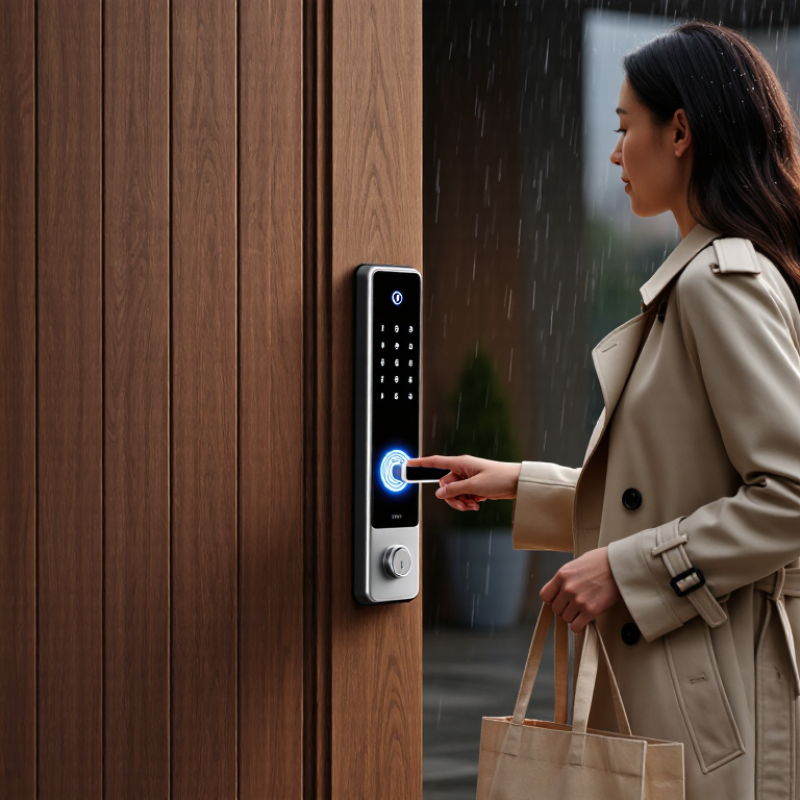
Small details matter. Imagine standing outside in rain, touching a dark keypad with cold fingers. Will it respond quickly? Can you enter without looking? What happens if the battery dies?

No lock is perfect. That deserves honest attention. A connected model can create new privacy concerns, while a basic keypad may offer fewer features. Still, when selected carefully, a Keyless Entry Door Lock can combine practical access with sensible protection. The goal is not futuristic technology. It is dependable security that fits real life.
Why Choose a Keyless Entry Door Lock?

What Is a Keyless Entry Door Lock?

A keyless entry door lock is a locking system that opens without a traditional metal key. Instead, it verifies an approved code, fingerprint, phone signal, or access card. Inside the door, a small motor moves the deadbolt after successful verification. The lock usually runs on batteries, so it can continue working during a power outage. However, a dead battery can become an inconvenient surprise.

This type of lock offers practical control at home. You can create temporary codes for guests, monitor entry records, and remove access without collecting spare keys. A keypad feels useful when your hands are full of groceries. Fingerprint access can be faster, but wet or dirty fingers may cause errors. No lock is flawless. Security still depends on strong settings, careful installation, and a door frame that closes firmly.

Tips: Choose a lock with low-battery alerts and a reliable backup method. Test the code before closing the door completely. Keep the battery compartment dry, and inspect the screws after several weeks. Avoid simple codes based on birthdays or house numbers. Read the access log occasionally, even if everything seems normal. A keyless lock improves convenience, but it should not replace basic door maintenance.

How Keyless Entry Door Locks Work

Why Choose a Keyless Entry Door Lock?

How Keyless Entry Door Locks Work

A keyless entry door lock replaces a traditional key with a digital credential. You may enter a code, touch a fingerprint sensor, or use a mobile device. The lock reads that credential and checks whether it matches stored access data. If approved, a small motor moves the internal bolt. The door opens without a metal key.

Most systems use batteries inside the indoor housing. Some models connect through wireless networks, while others work independently. Standalone locks can be more reliable during internet interruptions. Connected models may send access alerts or record entry times. However, these features depend on secure settings and regular software updates.

Daily use is simple. A homeowner can create separate codes for family members, cleaners, or guests. Temporary codes can expire after a selected period. That is useful when handing over a physical key feels inconvenient. Still, electronic locks are not effortless. Low batteries, dirty sensors, or forgotten codes can cause frustration. Keep the emergency power method accessible, and test it occasionally. I also recommend checking the door alignment, because a strong lock cannot compensate for a door that sticks. Convenience matters, but careful maintenance matters more.

Types of Keyless Entry Door Locks

Keyless entry door locks replace traditional keys with codes, fingerprints, cards, or mobile devices. They do not all work the same way. Understanding the main types helps homeowners choose a lock that fits daily habits, door design, and security needs.

A keypad lock opens when users enter a personal code. It works well for families, rental properties, and service access. Keep the numbers private. That detail matters. Fingerprint locks identify an authorized user through biometric scanning. They are quick, but wet fingers, dust, or small injuries may affect recognition. Card or fob locks use short-range credentials and allow quick access. Lost credentials must be removed promptly. Control is essential. Smart locks connect with Bluetooth, Wi-Fi, or a home hub. Some allow temporary codes and activity records through an app. A strong network password still matters.

From practical installation experience, battery access is easy to overlook. Choose a model with a visible low-battery warning and an external emergency power option. For exterior doors, check weather resistance and operating temperature information. A mechanical override can provide useful backup during power failure. I once underestimated how often children would enter through the side door. The lock worked correctly, but the access records became difficult to review. That small oversight changed the setup. Look for adjustable auto-lock timing, clear instructions, and tested safety performance. Convenience should not replace careful installation or regular maintenance.

Why Choose a Keyless Entry Door Lock? - Types of Keyless Entry Door Locks

Lock Type Primary Access Method Power Requirement Typical User Capacity Main Advantages Important Considerations Best-Suited Applications
Keypad Lock PIN code entered on a physical or touchscreen keypad Usually battery-powered; some models include mechanical backup keys Commonly supports multiple individual codes; the exact limit depends on the model No physical key is needed; codes can often be changed or deleted; useful for families and rentals Users must protect their PINs; batteries require periodic replacement; touchscreen models may be affected by dirt or moisture Residential entrances, rental properties, offices, and utility rooms
Touchscreen Lock 数字 PIN entered on a touch-sensitive display Battery-powered; low-battery alerts are common Generally allows several stored PINs, depending on the product design Clean appearance; illuminated controls can improve nighttime use; some models conceal or randomize keypad input The screen may be less responsive with wet or gloved fingers; fingerprints can reveal frequently used areas Modern homes, apartments, and interior access points
Fingerprint Lock Biometric fingerprint recognition Battery-powered; many designs provide an emergency power contact or backup key Often stores multiple fingerprints; capacity varies by model Fast entry without remembering a code or carrying a key; convenient for frequent users Recognition can be affected by dirt, moisture, cuts, or worn fingerprints; a backup access method is essential Family homes, private offices, and areas requiring frequent access
RFID or NFC Lock Contactless card, key fob, or compatible mobile device Typically battery-powered for standalone doors; access systems may use wired power Can support multiple cards or fobs, depending on the access system Quick tap-to-unlock operation; credentials can often be issued or canceled individually Lost cards or fobs must be deactivated; compatibility depends on the credential technology used Hotels, offices, shared facilities, and multi-user buildings
Bluetooth Smart Lock Bluetooth-enabled smartphone and a mobile application Battery-powered; some models support temporary external power Usually supports multiple app users or digital keys, depending on the software Can enable hands-free or proximity-based unlocking; digital permissions can be shared and revoked Phone battery, Bluetooth settings, app permissions, and operating-system compatibility can affect access Residential doors, private offices, and users who regularly carry a smartphone
Wi-Fi Smart Lock Mobile application, web account, PIN, or integrated smart-home system Usually battery-powered; Wi-Fi communication may increase energy consumption Often supports multiple users, temporary codes, and scheduled permissions Remote status checks, activity notifications, scheduled access, and smart-home integration Remote features depend on internet and account security; firmware and application updates should be maintained Connected homes, vacation rentals, property management, and remote-access situations
Remote-Controlled Lock Dedicated remote control, wireless button, or authorized control panel Battery-powered or connected to a wired access-control system Depends on the number of paired remotes or authorized controllers Convenient for users who need to unlock a door without touching the lock; can support controlled entry points The remote must be protected from loss or unauthorized use; wireless range and interference may affect operation Gates, garages, private driveways, and controlled-access areas
Keyless Entry Lever or Handle PIN, card, fingerprint, smartphone, or a combination of methods Usually battery-powered; some commercial systems use wired power Varies according to the integrated access technology Combines the handle and locking mechanism in one unit; can be convenient for interior or light-duty doors Must match the door preparation, handing, backset, and security requirements; not every model is suitable for exterior doors Bedrooms, offices, storage rooms, and selected residential doors

Selection note: Before choosing a keyless entry door lock, verify door thickness, backset, lock type, weather exposure, battery access, emergency-entry options, and applicable security requirements. Actual user capacity and features vary by model.

Key Benefits and Security Features

A keyless entry door lock replaces the familiar metal key with a code, fingerprint, phone connection, or access card. Its main benefit is controlled convenience. You can enter with full hands, share temporary access, and avoid hiding spare keys outdoors. That feels simple. It also reduces the risk of lost keys being copied without your knowledge. In daily home use, clear instructions and responsive controls matter as much as advanced technology.

Security features deserve closer attention. Look for encrypted communication, failed-entry alerts, automatic locking, and detailed access records. A temporary code can help a cleaner or visitor enter during a specific period. It should expire afterward. Some systems also detect repeated incorrect attempts and pause access briefly. A backup power option is important when batteries run low. Mechanical emergency access may provide extra reassurance, but it must remain protected from casual discovery. Not every feature improves safety.

Reliable installation affects performance. The door should close smoothly before the lock is fitted. Misalignment can cause failed locking, noisy operation, or unnecessary battery drain. I would check the battery warning system regularly, even when the lock appears dependable. That small habit is easy to overlook. Weather exposure, weak Wi-Fi, and poor app permissions can also reduce reliability. A professional assessment helps match the lock’s features to the door, household routines, and expected users. No lock is perfect. Careful setup still makes a meaningful difference.

Factors to Consider Before Choosing One

Choosing a keyless entry door lock requires more than liking its modern appearance. Start with your door’s material, thickness, hinge direction, and existing latch. An incompatible fit can weaken security. Measure carefully.

Power reliability matters. Most electronic locks use batteries, so check expected battery life and warning signals. Choose a model with a dependable mechanical backup or emergency power option. Test access methods before installation, including keypad codes, mobile control, or fingerprint recognition. Wet fingers, poor lighting, and dead phones can expose weaknesses.

Security features deserve close attention. Look for strong encryption, automatic locking settings, tamper alerts, and a clear process for deleting former users. Access logs can help families and property managers identify entry times. However, logs may create privacy concerns, especially in shared homes. Keep codes private, update them when someone moves out, and avoid using birthdays.

The lock should also match your daily routine. A parent carrying groceries may prefer hands-free access, while an older resident may need large buttons and simple instructions. Check its resistance to rain, dust, and winter temperatures. Professional installation can prevent alignment problems, though careful homeowners may manage it with the correct tools.

Read the warranty, support terms, and data practices before paying. Some systems depend heavily on an internet connection. That dependency is easy to underestimate. A keyless lock can improve convenience, but it cannot replace a solid door, secure frame, and sensible user habits. Even a well-reviewed choice may not suit every household.

Why Choose a Keyless Entry Door Lock?

Durability is one of the key factors to consider before choosing a keyless entry lock.

The chart shows ANSI/BHMA A156.2 durability benchmarks for residential cylindrical locks: Grade 1 is tested to 800,000 cycles, Grade 2 to 400,000 cycles, and Grade 3 to 250,000 cycles. When choosing a keyless lock, also verify electronic certification, battery-life claims, emergency power access, weather resistance, installation compatibility, and the available access methods.

Reference: ANSI/BHMA A156.2 performance-grade durability requirements.